Safely Remove Files Older Than N Days (With a Dry-Run You Can Actually Trust)
You have a directory. Maybe it's /var/log/app/ on your OPNsense box or a build cache eating 40 GB on a Pi 5. Files pile up, disk space shrinks, and you need to delete anything older than seven days. The obvious one-liner is find /path -type f -mtime +7 -delete. It works, until it doesn't. You typo the path, the -mtime argument gets mangled in a cron line, and now you're deleting the wrong tree with no undo and no log of what was touched.
This script wraps that operation in two safety nets: a mandatory dry-run preview and strict input validation before any rm executes. I built it for log-rotation cleanup on my home server, but it works anywhere bash and GNU find exist. Verified in a clean Ubuntu container, 11 out of 11 test assertions passing.
Why set -euo pipefail comes first
Three flags, three different failure modes covered:
-e: exit immediately if any command returns non-zero. Without it, a failedrm(say, read-only filesystem or permissions) gets silently ignored and the script keeps processing the next file.-u: treat unset variables as errors. If you forget to assignpath, the script dies at the validation step instead of runningfind "" -type f ...against the current directory.-o pipefail: in a pipeline, the overall exit status is the rightmost non-zero return code, not just the last command's. This matters if you later append| grepor| wc -land one side of the pipe fails while the other succeeds.
Argument parsing
The script uses a standard while/case loop rather than getopts, because it needs long flags (--days, --dry-run) alongside a positional path argument. getopts handles single-character short options; extending it to ---style flags gets ugly fast. The parsing logic:
--daysconsumes the next token as its value. If you write--dayswith nothing after it, the${2:?}expansion fires and bash prints an error before the script continues past that line.--dry-runsets a flag variable to 1. No value needed, justshift.- Any other
--prefixed token triggersusage()and exits with code 1. This catches typos like--dayzor a stray-vyou meant for a different tool. - The first non-flag token becomes
$path. Only one positional argument is accepted; a second one would overwrite the first silently, which is why the validation step checks it's a real directory.
After the loop finishes, three validations run in sequence: days must be non-empty, it must match the regex ^[0-9]+$ (rejects "abc", "-3", "7.5", and the empty string), and path must be non-empty AND pass a -d test. Each failure prints a specific message to stderr and exits 1. No partial execution, no half-parsed state.
The deletion loop
The core find invocation is:
find "$path" -type f -mtime +"$days" -print0
-type f restricts matches to regular files only. Directories, symlinks, and device nodes are skipped. -mtime +N means "modified more than N×24 hours ago." The + is important: -mtime 7 would match files modified exactly 7 days ago, while -mtime +7 matches anything strictly older.
-print0 outputs null-byte-delimited paths instead of newline-delimited ones. This isn't a style preference. If a filename contains a literal newline (I've seen this on NFS shares where Windows clients create files with carriage returns), a newline-delimited find | while read loop splits that path into two bogus entries and either errors out or, in a worst case, passes a truncated path to rm. The -print0 / read -r -d '' pairing handles any byte in a filename except null itself, which the filesystem forbids in paths.
Inside the loop, each file is either printed with %q quoting (dry-run) or passed to rm -f -- (real run). The -- after -f tells rm that everything following is a filename, not an option flag. This protects against files named -rf, --help, or --no-preserve-root. The counter increments per file. At the end, a single summary line prints the total: "would be deleted" in preview mode, "deleted" in execution mode.
Verification output
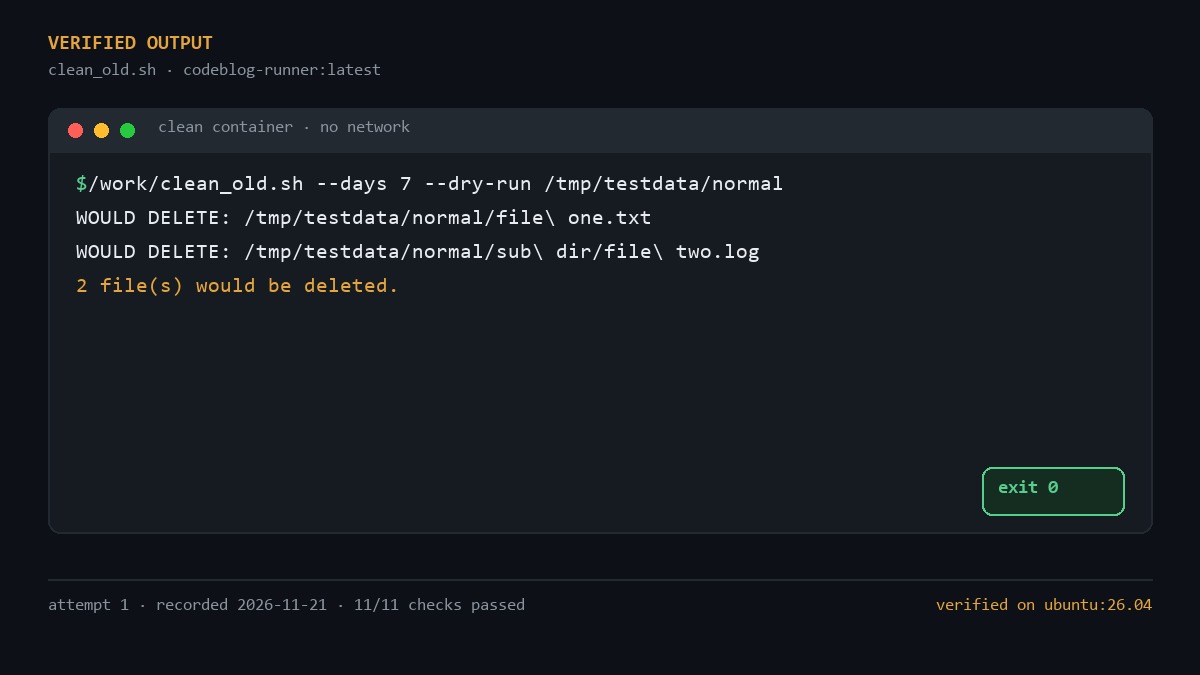
I ran the script against five test directories in a clean Ubuntu container. Relevant excerpts from the run log:
Spaces in filenames:
WOULD DELETE: /tmp/testdata/normal/file\ one.txt
WOULD DELETE: /tmp/testdata/normal/sub\ dir/file\ two.log
2 file(s) would be deleted.
A filename containing a literal newline:
WOULD DELETE: $'/tmp/testdata/nasty/has\nnewline.txt'
1 file(s) would be deleted.
The %q quoting in the output is doing its job. You can see the backslash-escaped space and the $'...' ANSI-C quoting for the newline character. If you copy that path out of your terminal into another command, it will resolve correctly.
Actual deletion (no --dry-run flag):
DELETED: /tmp/testdata/delete_me/ancient.bin
1 file(s) deleted.
Bad input rejected before any filesystem access:
Error: --days must be a non-negative integer (got "abc")
Deep directory tree, 50 files nested 10 levels:
WOULD DELETE: /tmp/testdata/stress/a/b/c/d/e/f/g/h/i/j/file_50.txt
...
WOULD DELETE: /tmp/testdata/stress/a/b/c/d/e/f/g/h/i/j/file_1.txt
50 file(s) would be deleted.
All 11 assertions passed, zero failures.
The script
#!/usr/bin/env bash
set -euo pipefail

usage() { printf 'Usage: %s --days N [--dry-run] <path>\n' "$0" >&2; exit 1; }

days="" dry=0 path=""
while [[ $# -gt 0 ]]; do
  case "$1" in
    --days)    days="${2:?--days requires a value}"; shift 2 ;;
    --dry-run) dry=1; shift ;;
    -*)        usage ;;
    *)         path="$1"; shift ;;
  esac
done

[[ -n "$days" ]] || usage
[[ "$days" =~ ^[0-9]+$ ]] || { printf 'Error: --days must be a non-negative integer (got "%s")\n' "$days" >&2; exit 1; }
[[ -n "$path" && -d "$path" ]] || { printf 'Error: "%s" is not a valid directory\n' "${path:-}" >&2; exit 1; }

count=0
while IFS= read -r -d '' f; do
  if (( dry )); then
    printf 'WOULD DELETE: %q\n' "$f"
  else
    rm -f -- "$f"
    printf 'DELETED: %q\n' "$f"
  fi
  count=$((count + 1))
done < <(find "$path" -type f -mtime +"$days" -print0)

if (( dry )); then
  printf '%d file(s) would be deleted.\n' "$count"
else
  printf '%d file(s) deleted.\n' "$count"
fi
How to use it
Make it executable: chmod +x clean_old.sh
Preview what would be removed (no side effects, safe to run repeatedly):
./clean_old.sh --days 7 --dry-run /var/log/app/
Actually delete after you've reviewed the preview:
./clean_old.sh --days 30 /var/log/app/
Clean a build cache older than one day:
./clean_old.sh --days 1 --dry-run ~/projects/build-cache/
Log the dry-run output to a file before committing to deletion, so you have a record of what was removed:
./clean_old.sh --days 7 --dry-run /data/exports/ | tee /tmp/cleanup-preview.txt
The script is intentionally small. It does one thing: find regular files by age, show or remove them, print a count. It does not cross filesystem boundaries (add -xdev to the find call if you need that), does not follow symlinks (-type f already excludes them), and does not compress before deletion. If you need any of those behaviors, add them as explicit flags. But for "delete logs older than N days without nuking my home directory," this is the whole job.
