review-done.com — automate your employee performance reviews
Looking to automate employee performance reviews? I built review-done.com to replace the spreadsheets, lost emails and manual score-averaging with a fully automated workflow — secure links, automatic follow-ups at every stage, and a finished PDF for everyone. Here's the problem it solves and how it works.
Why traditional reviews are a pain
If you've ever run an annual review cycle, you know the drill:
- Fragmented data. Feedback lives in Word docs, email threads and attachments that get lost the moment the cycle ends.
- Calculation nightmares. Managers score on slightly different forms, and someone — usually HR — spends hours manually averaging the numbers.
- The nagging loop. Half the work is just chasing people: "have you done your review yet?" — repeated until everyone finally signs off.
- Zero visibility. There's no single place that shows which reviews are done and which are still outstanding.
- Security risk. Sensitive performance data sits unencrypted in ordinary email inboxes, forwarded around without any control.
None of that is about the review itself. It's about the plumbing — and the plumbing is where all the time goes.
What review-done.com does
review-done.com is an automated review platform. You create a review, and the system runs the whole workflow for you: it sends secure links, follows up with people at every stage, calculates the scores, and emails everyone a finished PDF. No spreadsheets, no chasing, no manual math.
It handles the common review types — annual, performance, achievement, spot reviews and manager feedback — and it's built as a multi-tenant platform, so each company's data is isolated in its own dashboard.
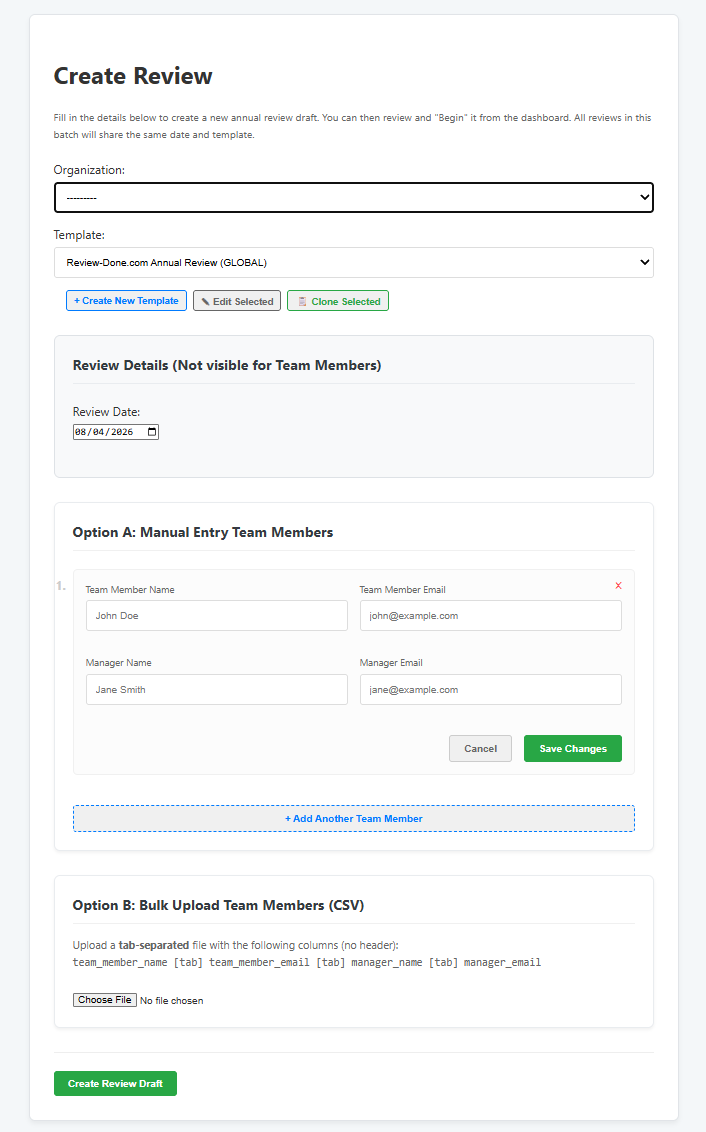
Kicking one off is a single screen: pick the review type, the people and the date, and the platform takes it from there.
How the 4-step workflow works
The process is deliberately simple. Four steps, and the system drives each one:
- Initiate. You sign up and create a review. The staff member immediately gets a secure, OTP-protected link — no account needed on their side.
- Self-assessment. The team member fills in their section. The moment they sign off, the manager is automatically notified.
- Manager review. The manager adds their feedback and scores. The system calculates the averages and the final result — no manual math.
- Completion. HR, the team member and the manager all receive a professional PDF copy by email, automatically.
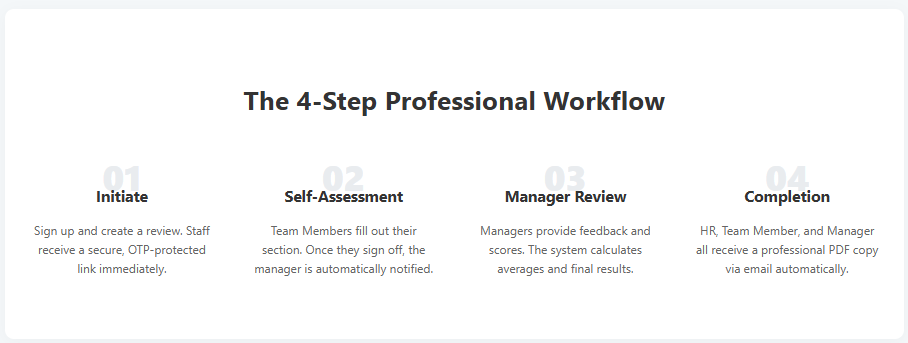
That final step is the one that kills the "nagging loop": nobody has to chase anyone, because the notifications fire on their own at every stage.
The features that matter
- Hands-free workflow. Automated email notifications trigger at every stage, so the review moves forward without you pushing it.
- Professional templates. Use the built-in "best-in-class" review form, or build your own in seconds with the template editor.
- Real-time analytics. One-click CSV and PDF ZIP exports for company-wide reporting.
- Secure access. Hashed, OTP-protected links mean only the right people can see each review.
- Two-factor authentication. Accounts are protected with TOTP 2FA, on top of the OTP-protected review links.
- Bulk import. Bring your whole team in with a CSV so you're not creating reviews one by one.
- Single source of truth. Every review and its full history is stored centrally in one multi-tenant dashboard.
Security, taken seriously
Performance data is sensitive — it's literally people's careers on the line. So the platform is built security-first. Review links are hashed and protected with a one-time password, so a link sitting in someone's inbox can't just be forwarded to the whole office. Accounts support two-factor authentication, and the multi-tenant design keeps each organisation's data isolated from every other's.
Pricing
It starts free, which is a good way to trial it on a real review cycle:
| Plan | Price | What you get |
|---|---|---|
| Free | $0 | 5 review credits, bulk CSV import, PDF & CSV exports |
| Tier 1 | $99 | 20 review credits (~$4.95 each), priority support |
| Tier 2 | $399 | 100 review credits (~$3.99 each), custom form templates |
| Tier 3 | $1,499 | 500 review credits (~$2.99 each), unlimited organisations |
Need more than 500 reviews? There's an enterprise tier with custom contracts for high-volume needs.
Who it's for
Any team that does formal reviews: HR teams, office managers, and business owners who are tired of the spreadsheet-and-email shuffle. It's especially useful if your reviews have ever dragged on for weeks because someone forgot to sign off — the automated notifications are designed to make that stop happening.
Get started
You can sign up free — no credit card, and it takes about a minute to set up. Try it on your next review cycle and see how much of the admin just disappears.
If you give it a go, I'd love to hear what you think. There's a contact form on techgeek.biz if you want to send feedback on what to build next.
Suggested
