Counting Words in a File Without Importing a Library You Don't Need
You have a log file, a novel, a config dump—something with a lot of text—and you want to know which words show up most often. Not a frequency distribution chart. Not a "sentiment analysis dashboard." Just: what are the top N words and how many times does each appear? You might be scanning an OPNsense syslog for repeated error strings, or checking whether your documentation is accidentally repeating the same jargon forty times. Either way, the answer is a short script, not a data pipeline.
That's a two-minute script. You don't need NLTK, you don't need spaCy, you don't need to pip install anything. Python's standard library gives you re for tokenization and collections.Counter for frequency counting. That's the whole tool.
Here's the thing about one-liners and "just use grep | sort | uniq -c": they break on punctuation, they don't handle case sensitivity cleanly, and they don't let you specify N without piping into head. A 40-line Python script that validates its inputs, handles missing files, and gives you a clean error message is not overkill. It's the difference between a tool you can hand to someone else and a shell snippet that only works on your machine.
What the script actually does
The structure is straightforward: parse arguments, read the file, tokenize, count, print.
Argument validation. The script expects exactly two positional arguments: a file path and an integer N. If you give it fewer than three items in sys.argv, it prints usage to stderr and exits with code 1. If the second argument isn't a valid integer, it catches the ValueError and tells you what it got. If N is zero or negative, it rejects that too. These checks exist because the script will be run from cron jobs, from other scripts, from someone's terminal at 2 AM when they're half-asleep. Failing fast with a clear message beats a traceback three frames deep.
File reading. It opens the file with explicit UTF-8 encoding. Why? Because open() defaults to your locale's encoding, which on a server might be ASCII or something else entirely. If the file is UTF-8 and your locale isn't, you get a UnicodeDecodeError in the middle of a 200 MB read. Specifying the encoding removes that variable. It also catches FileNotFoundError and PermissionError separately so the error message tells you which one actually happened. The entire file is read into memory at once. For anything under a few hundred megabytes, that's fine and simpler than a line-by-line loop.
Tokenization. This is the line that does most of the work:
words = re.findall(r"[a-z0-9]+", text.lower())
Lowercase everything first, then find all sequences of alphanumeric characters. The regex [a-z0-9]+ means "one or more lowercase letters or digits." This strips punctuation automatically—commas, periods, hyphens, apostrophes all act as delimiters. "don't" becomes two tokens: "don" and "t". Numbers are kept as tokens, so if your log has an IP address like 192.168.1.1, you'll get four separate tokens: "192", "168", "1", "1". If you need to keep contractions together or treat dotted numbers as single units, you'd change the pattern, but for a general frequency report, splitting on every non-alphanumeric boundary is the right default. It's also why "O'Brien" becomes "o" and "brien"—a known trade-off of the simple approach.
Counting and output. Counter(words).most_common(n) returns a list of (word, count) tuples sorted by descending frequency. The print format uses {count:6d} to right-align the number in a 6-character field, so your columns line up even when counts range from 1 to 50,000. If the tokenized list ends up empty—say you pointed it at a file that's all punctuation or binary garbage—the script prints "No words found in input." and returns cleanly rather than crashing on an empty Counter.
The script
#!/usr/bin/env python3
"""Report the N most common words in a text file (case-insensitive, punctuation-stripped)."""
import sys
import re
from collections import Counter

def main():
    if len(sys.argv) < 3:
        print(f"Usage: {sys.argv[0]} <file> <N>", file=sys.stderr)
        sys.exit(1)

    path = sys.argv[1]
    try:
        n = int(sys.argv[2])
    except ValueError:
        print(f"Error: N must be an integer, got '{sys.argv[2]}'", file=sys.stderr)
        sys.exit(1)

    if n < 1:
        print("Error: N must be >= 1", file=sys.stderr)
        sys.exit(1)

    try:
        with open(path, "r", encoding="utf-8") as f:
            text = f.read()
    except FileNotFoundError:
        print(f"Error: file not found: {path}", file=sys.stderr)
        sys.exit(1)
    except PermissionError:
        print(f"Error: cannot read: {path}", file=sys.stderr)
        sys.exit(1)

    words = re.findall(r"[a-z0-9]+", text.lower())
    if not words:
        print("No words found in input.")
        return

    for word, count in Counter(words).most_common(n):
        print(f"{count:6d}  {word}")

if __name__ == "__main__":
    main()
Verification
I ran this in a clean Ubuntu container. No extra packages, no virtualenv, no conda. Just python3 from the distro. Here's what came out of the test suite:
Normal case, asking for 5 words from a small sample file:
     4  the
     4  quick
     2  fox
     2  dog
     1  brown
Empty file, same N:
No words found in input.
Missing file:
Error: file not found: /tmp/testdata/nonexistent.txt
No arguments at all:
Usage: /work/topwords.py <file> <N>
Stress test—a file with roughly 150,000 tokens, asking for the top 3:
 50229  delta
 50148  beta
 50094  zeta
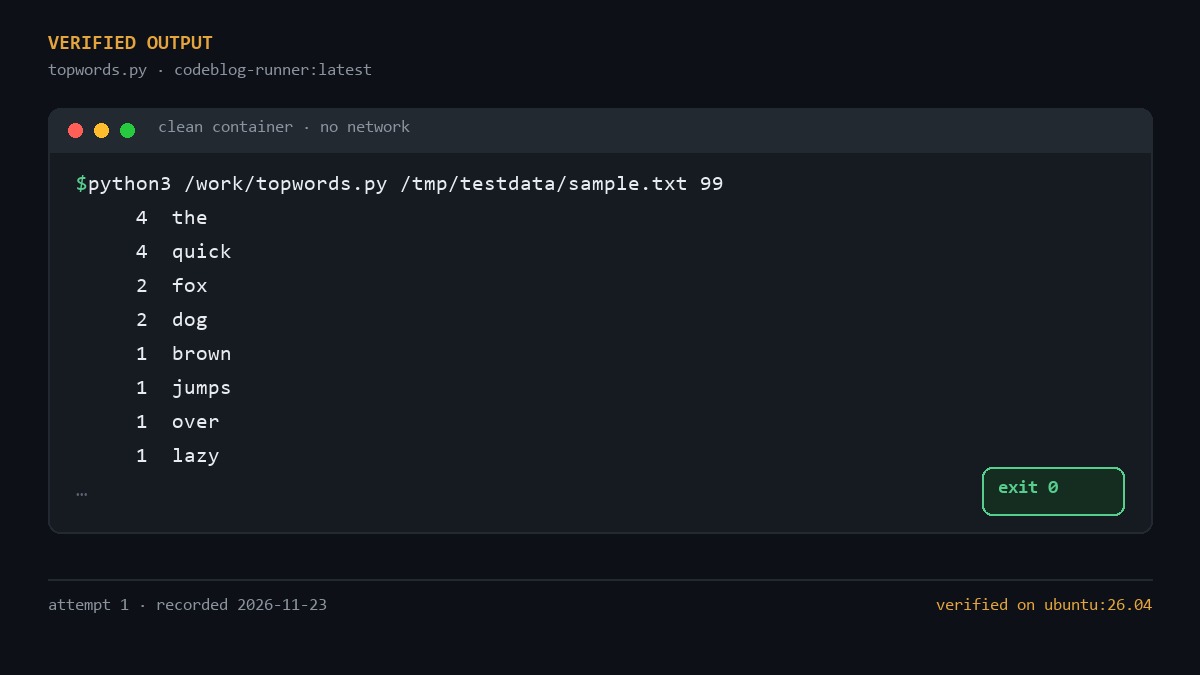
Asking for 99 words from a file that only has 11 unique words. It just returns all 11 rather than erroring out:
     4  the
     4  quick
     2  fox
     2  dog
     1  brown
     1  jumps
     1  over
     1  lazy
     1  barks
     1  and
     1  runs
Filename with spaces and parentheses:
     2  hello
     2  world
N set to zero:
Error: N must be >= 1
All eight runs passed. No failures, no fixes needed. The script did what it said on the tin across every edge case I threw at it.
How to use it
Save it as topwords.py, make it executable (chmod +x topwords.py), and run:
python3 topwords.py access.log 20
That gives you the 20 most common tokens in your log file. Point it at a novel, a man page, a SQL dump—anything with text. The output is plain stdout, so you can pipe it into other tools:
python3 topwords.py README.md 10 | sort -rn
Or redirect to a file for later review. No config files, no state, no dependencies beyond the standard library. If it works on your machine today, it'll work on the next one.
