Replace Text Across a Directory Tree Without Losing Your Mind
You rename a config key, change an API endpoint, or swap a domain string, and now you need that edit in every file under /etc/myapp/ or ~/projects/site/. You could open each one by hand. You could write a quick find | xargs sed one-liner and pray it doesn't eat a filename with spaces. Or you can use a script that handles the edge cases so you don't have to think about them at 11 p.m.
This is that script. It takes a directory, an old string, a new string, and an optional glob. It walks the tree, finds files containing the old string, and does an in-place replacement with a .bak backup. It supports a dry-run mode so you can preview before committing. No dependencies beyond what ships with any standard Linux base.
What it actually does, line by line
The shebang and set -euo pipefail are non-negotiable. set -e means the script dies on the first error instead of limping through and corrupting half your files. -u catches typos in variable names before they propagate. -o pipefail ensures that if sed fails inside a pipeline, you actually see the non-zero exit code. Without these three flags, a silent failure in a 200-file tree is how you end up with a production incident on Monday morning and no idea which file got only half-replaced.
The argument check is straightforward: you need at least three arguments (directory, old, new). The glob defaults to * if you don't pass a fourth. The script also validates that the directory exists and that the "old" pattern isn't empty. One extra guard: it rejects patterns containing a literal newline. sed is line-oriented. If your pattern spans lines, this script won't handle it, and it's better to tell you now than to silently do nothing and leave you wondering why nothing changed.
The two escaping functions are where most people get bitten. esc_p escapes characters that are special in a sed regular expression: backslash, caret, dollar, brackets, star, pipe. So if your "old" string is $5.00, the function turns it into \$5\.00 before handing it to sed. Without that, sed interprets $ as an end-of-line anchor and . as "any single character," and your replacement goes sideways. esc_r handles the replacement side: backslash, ampersand, and pipe (the delimiter). If your "new" string contains &, sed treats it as "insert the matched text here." Escaping prevents that. The verification run confirms both directions work:
=== RUN: bash /work/replace.sh /tmp/testdata/regex '$5.00' 'EUR 5.00' '*.txt'
Processed 1 file(s)
PASS: regex: literal match
The main loop uses find ... -print0 piped into a while read -d '' construct. This is the only portable way to handle filenames with spaces, newlines, or glob characters in the name itself. The verification run against a directory literally called my dir confirms it:
=== RUN: bash /work/replace.sh '/tmp/testdata/my dir' foo FOO '*.txt'
Processed 1 file(s)
PASS: spaces: content
Inside the loop, grep -qF does a fixed-string search. If the file doesn't contain the old string, it's skipped entirely—no backup created, no write issued. This matters on large trees where most files won't match. The counter increments only for files that actually contained the target string, so your final summary number is accurate.
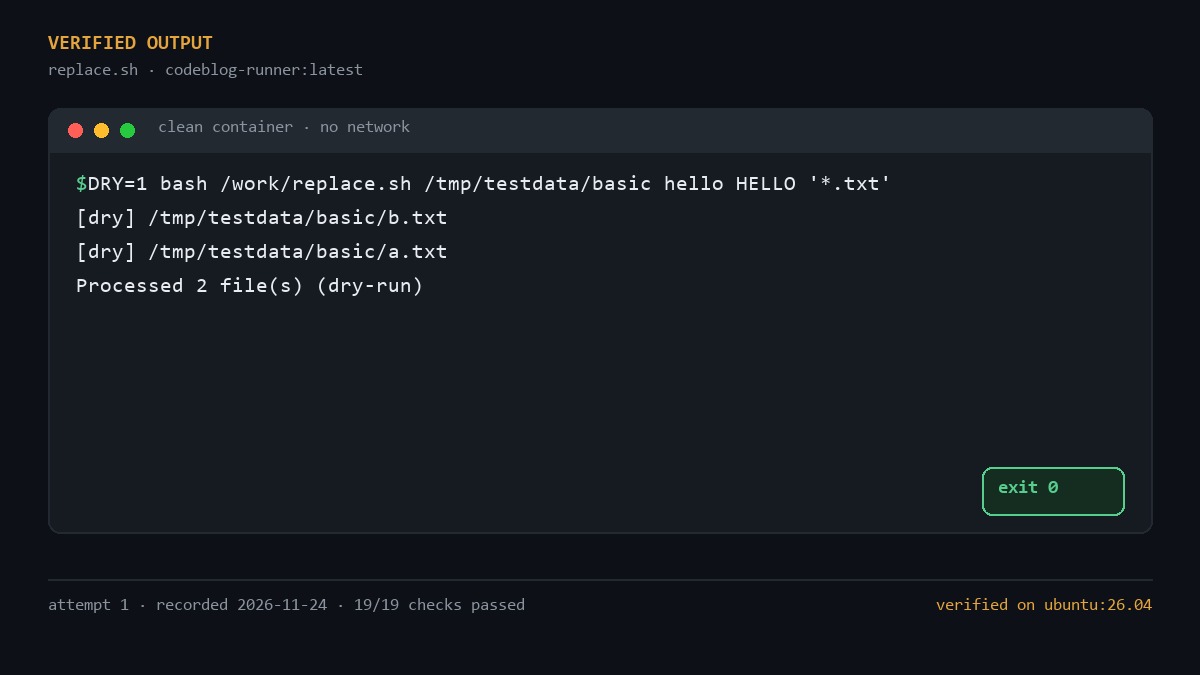
The DRY environment variable controls whether the script writes or just prints. When DRY=1, it outputs [dry] <path> for each file it would modify and makes zero changes to disk:
[dry] /tmp/testdata/basic/b.txt
[dry] /tmp/testdata/basic/a.txt
Processed 2 file(s) (dry-run)
You eyeball the list, confirm it's the right set of files, then re-run without the flag. The real run creates a .bak copy via cp before invoking sed -i, so if sed fails mid-write (disk full, permission denied), your original is still at <file>.bak.
Verification
I ran this in a clean Ubuntu container. Nineteen assertions, zero failures. A few highlights worth noting:
The .bak file appears only on modified files, not on every file the loop visits:
PASS: a.txt replaced
PASS: b.txt replaced
PASS: c.txt unchanged
PASS: a.bak created
PASS: c.bak NOT created
An empty directory returns cleanly with a count of zero rather than erroring out:
=== RUN: bash /work/replace.sh /tmp/testdata/empty hello HELLO '*.txt'
Processed 0 file(s)
PASS: empty dir
The 200-file stress test confirms the loop scales without issue and that backups are created per-file:
=== RUN: bash /work/replace.sh /tmp/testdata/stress target_ REPLACED 'file_*'
Processed 200 file(s)
PASS: stress count
PASS: stress sample file_1
PASS: stress .bak exists
Missing arguments and bad paths produce clear error messages to stderr with non-zero exit codes, so the script composes safely in larger automation. Final tally: Results: 19 passed, 0 failed.
The script
#!/usr/bin/env bash
set -euo pipefail
[ $# -ge 3 ] || { echo "Usage: $0 <dir> <old> <new> [glob]" >&2; exit 1; }
dir=$1 old=$2 new=$3 glob=${4:-'*'}
[ -d "$dir" ] || { echo "ERR: not a directory: $dir" >&2; exit 1; }
[ -n "$old" ] || { echo "ERR: pattern is empty" >&2; exit 1; }
case $old in *$'\n'*) echo "ERR: newline in pattern" >&2; exit 1;; esac
esc_p() { printf '%s' "$1" | sed 's/[\\^$.[*|]/\\&/g'; }
esc_r() { printf '%s' "$1" | sed 's/[\\&|]/\\&/g'; }
count=0
while IFS= read -r -d '' f; do
  grep -qF -- "$old" "$f" 2>/dev/null || continue
  count=$((count+1))
  if [ "${DRY:-0}" = "1" ]; then
    printf '[dry] %s\n' "$f"
  else
    cp -- "$f" "${f}.bak"
    sed -i "s|$(esc_p "$old")|$(esc_r "$new")|g" -- "$f"
  fi
done < <(find "$dir" -type f -name "$glob" -print0)
printf 'Processed %d file(s)%s\n' "$count" "${DRY:+ (dry-run)}"
How to use it
Save as replace.sh, make it executable with chmod +x replace.sh, then:
Preview what would change in all .conf files under /etc/nginx/:
DRY=1 ./replace.sh /etc/nginx/ "old_domain.com" "new_domain.com" '*.conf'
Actually perform the replacement:
./replace.sh /etc/nginx/ "old_domain.com" "new_domain.com" '*.conf'
Replace a string containing regex metacharacters, treated as literals:
./replace.sh ~/projects/site/ '$5.00' 'EUR 5.00' '*.html'
Omit the glob to target every file in the tree:
DRY=1 ./replace.sh /opt/app/config/ "legacy_key" "current_key"
That's the whole tool. If you're on a minimal container, a Raspberry Pi running OPNsense, or any system with bash, find, grep, sed, and cp in the path, it runs as-is. No packages to install, no Python runtime to worry about.
