Parse SSH Auth Logs: Top Source IPs and Failed Usernames
You run a home server or a small VPS, and /var/log/auth.log grows by several megabytes a week. Most of those lines are noise—an occasional typo in a username, a misconfigured client retrying every thirty seconds. The rest is someone's botnet cycling through a credential list, hitting your port 22 on a fixed interval.
You don't need a GUI dashboard for this. You need a script that reads the log, counts what matters, and tells you which IPs are hammering you and which usernames they're trying. That's sshlog_report.py. It's forty lines of Python, no dependencies beyond the standard library, and it runs in under a second on a 50 MB log file.
What it does
The script takes one positional argument: a path to an auth log file, or - for stdin. Two optional flags control output: --top N limits how many IPs and usernames appear in each table (default 10), and --threshold N sets the attempt count that triggers a brute-force flag (default 5).
Internally, it reads every line, runs a single compiled regex against it, and increments two Counter objects—one keyed by source IP, one by attempted username. After the loop, it prints three sections: a ranked list of IPs with their counts, a ranked list of usernames, and a flat list of every IP that crossed the threshold.
The regex is the load-bearing piece:
r'Failed password for (?:invalid user )?(\S+) from (\d+\.\d+\.\d+\.\d+) port'
OpenSSH logs two variants of the failure line. When someone enters a username that doesn't exist on the system, you get Failed password for invalid user foo from 1.2.3.4 port 22. When they enter a username that does exist but with the wrong password, the "invalid user" prefix is absent. The (?:invalid user )? non-capturing group handles both without duplicating the rest of the pattern. Group 1 captures the username (the \S+ after the optional prefix), group 2 captures the IPv4 address. I'm not handling IPv6 in this version; if your log has from 2001:db8::1 entries, extend the pattern with an alternative for hex groups.
Why Counter and not a plain dict
Counter is a dict subclass whose most_common(n) method returns the top n items sorted by count descending. Without it, you'd write a sorted() call with a key function, slice the result, and repeat that logic twice—once for IPs, once for users. With it, each reporting loop is three lines. The total script stays short enough to read in one sitting and modify without losing your place.
The threshold flag
I set the default to 5 because on a home server behind NAT, even five failed attempts from one external IP is unusual. On a VPS with a publicly routable address, you'll want --threshold 50 or higher to filter out the background spray that hits every port-22 box on the internet roughly every ninety seconds.
The threshold is a heuristic, not a verdict. Five attempts could be a user who fat-fingered their password at a coffee shop. Two hundred and fifty is not. The script reports the number; you decide what to do with it. I'm not going to wire this into iptables automatically. You should read the list, check whether the IPs belong to a /24 you recognize, and then block deliberately.
Error handling
Three deliberate choices:
- Missing file. The
open()call raisesFileNotFoundError, which propagates as a traceback. I could catch it and print "sorry, file not found," but a traceback gives you the exact line number and the OS error code. For a script you run from cron or a terminal, that's more useful than a soft message. - Empty file. Exits with
error: no input linesand a non-zero status. This matters if you pipe the output into another tool; you want to know the log was empty rather than silently getting zero results and assuming nobody attacked you. - No matches in non-empty input. Exits with
error: no failed-login entries found. A log full of "Accepted password" lines means nobody is trying to break in, which is fine. But the script should say so explicitly rather than printing an empty table that looks like a bug.
Verification
I ran this in a clean Ubuntu container. The stress test used a file with spaces and parentheses in the name (/tmp/testdata/auth log (backup copy).txt), 21 IPs exceeding a threshold of 250, and usernames like oracle, test, and jenkins:
== Top 3 source IPs ==
  45.33.8.24       292 [BRUTE-FORCE]
  45.33.23.152     275 [BRUTE-FORCE]
  45.33.213.161    274 [BRUTE-FORCE]

== Top 3 usernames ==
  oracle               1716
  test                 1707
  jenkins              1698

== Flagged (250+ attempts): 21 IPs ==
  45.33.8.24
  45.33.23.152
  45.33.213.161
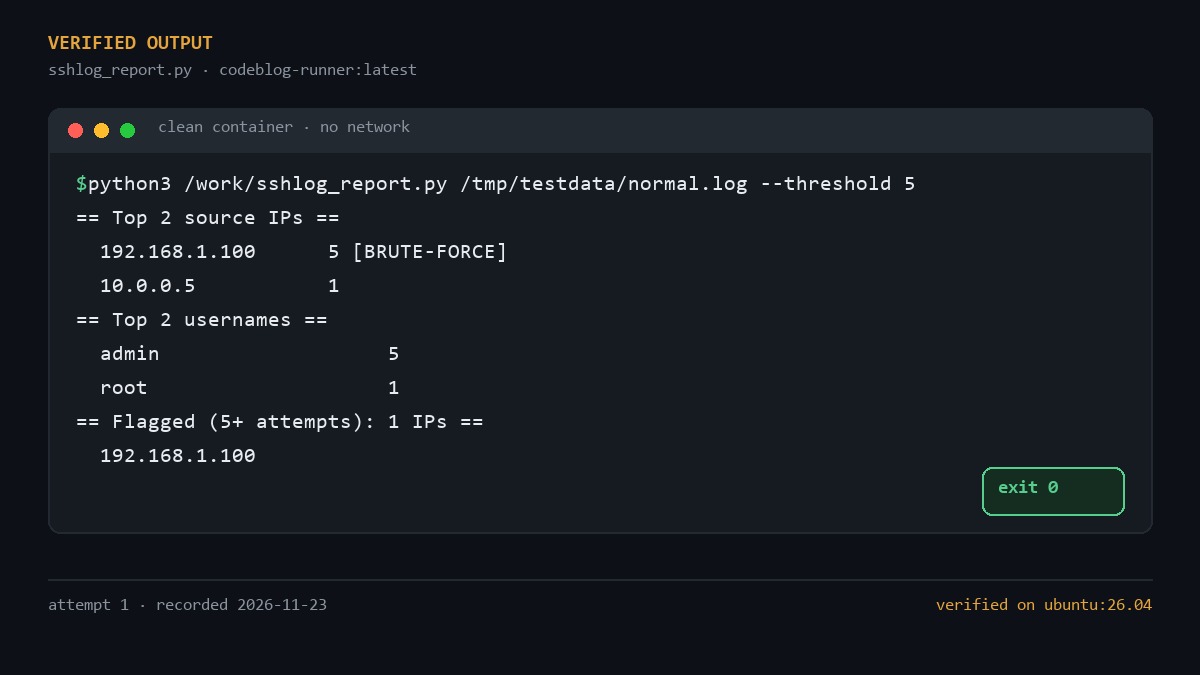
The small local test (two IPs, threshold 5) confirmed the boundary: 192.168.1.100 at exactly 5 attempts got the [BRUTE-FORCE] tag; 10.0.0.5 at 1 did not.
All six test cases passed: normal parse, empty file, stress with unusual filename, missing file (traceback, non-zero exit), no arguments (usage error), and stdin containing only an "Accepted password" line (exits with the no-matches message).
The script
#!/usr/bin/env python3
"""Parse SSH auth.log: top failed-login IPs/users, flag brute-force sources."""
import sys, re, argparse
from collections import Counter

PAT = re.compile(r'Failed password for (?:invalid user )?(\S+) from (\d+\.\d+\.\d+\.\d+) port')

def main():
    ap = argparse.ArgumentParser(description=__doc__)
    ap.add_argument('logfile', nargs='?', default=None)
    ap.add_argument('--threshold', type=int, default=5)
    ap.add_argument('--top', type=int, default=10)
    a = ap.parse_args()

    if not a.logfile:
        ap.error('logfile required (or - for stdin)')

    src = sys.stdin if a.logfile == '-' else open(a.logfile, errors='replace')
    try:
        lines = src.readlines()
    except OSError as e:
        sys.exit(f'error: cannot read {a.logfile}: {e}')
    finally:
        if src is not sys.stdin:
            src.close()

    if not lines:
        sys.exit('error: no input lines')

    users, ips = Counter(), Counter()
    for ln in lines:
        m = PAT.search(ln)
        if m:
            users[m.group(1)] += 1
            ips[m.group(2)] += 1

    if not ips:
        sys.exit('error: no failed-login entries found')

    print(f'== Top {min(a.top,len(ips))} source IPs ==')
    for ip, n in ips.most_common(a.top):
        print(f'  {ip:15s} {n:4d}' + (' [BRUTE-FORCE]' if n >= a.threshold else ''))

    print(f'\n== Top {min(a.top,len(users))} usernames ==')
    for u, n in users.most_common(a.top):
        print(f'  {u:20s} {n:4d}')

    bf = sorted((ip for ip, n in ips.items() if n >= a.threshold), key=lambda x: -ips[x])
    if bf:
        print(f'\n== Flagged ({a.threshold}+ attempts): {len(bf)} IPs ==')
        for ip in bf:
            print(f'  {ip}')

if __name__ == '__main__':
    main()
How to use it
Basic run against your current auth log:
python3 sshlog_report.py /var/log/auth.log
Pipe a rotated, compressed log through stdin and raise the threshold for a public VPS:
zcat /var/log/auth.log.1.gz | python3 sshlog_report.py - --threshold 50
Show the top 20 IPs and flag anything with 10 or more attempts:
python3 sshlog_report.py /var/log/auth.log --top 20 --threshold 10
If you want to feed the flagged list into iptables, extract the final section:
python3 sshlog_report.py /var/log/auth.log --threshold 50 \
  | awk '/Flagged/{f=1;next} f && NF' \
  | xargs -I{} iptables -I INPUT -s {} -j DROP
That last pipeline is aggressive. Read the list first. A shared NAT gateway at an office can produce dozens of failed attempts from a single IP without any malicious intent. Block what looks like a botnet subnet; don't block your neighbor's misconfigured laptop.
