Count Lines Across Many Files Without Losing Your Mind
The problem is simple: you have a directory tree, maybe a few hundred files, and you want one line count per file plus a total at the bottom. You could run wc -l on each file individually, but that's dozens of terminal tabs. You could pipe find into xargs wc -l, but then you get one grand total and no per-file breakdown unless you're careful with the flags. And if any filename has a space or a quote in it, your pipeline breaks silently.
I wrote linecount.sh to solve exactly this: give it one or more paths, it walks them, counts lines per file, prints a formatted table, and gives you a total. It handles spaces in filenames, supports depth limiting, supports glob filtering by extension, and exits with the right code when something is wrong.
The safety rails first
The shebang and the set line are non-negotiable for me:
#!/usr/bin/env bash
set -euo pipefail
set -e means any command that returns non-zero kills the script immediately. set -u means referencing an unset variable is a fatal error, not a silent empty string that propagates downstream. set -o pipefail means if anything in a pipe fails, the whole pipeline reports failure instead of just the last command's exit code. I don't write bash without these three flags. They cost you nothing and save you from an evening of "wait, why is this count zero?"
Argument parsing
The script uses getopts with a leading colon in the option string (":d:p:qh"). That leading colon matters: it tells getopts to handle unknown-option errors itself rather than printing its own message, so you control what the user sees. The -d flag takes a numeric depth for find -maxdepth, -p takes a glob pattern to filter filenames, and -q suppresses per-file output if you only need the total.
After parsing, the script shifts past the options and checks that at least one path argument remains. If not, it prints usage to stderr and exits 1.
Path validation
Before doing any counting work, the script loops over every provided path and checks [ -e "$p" ]. If a path doesn't exist, it prints an error to stderr and exits with code 2. This is distinct from exit 1 (bad usage) so that a calling script can tell "the user typed a nonsense flag" apart from "the directory was deleted between the time they hit enter and the script started running."
The counting loop
This is where most of the logic lives, and it's structured to handle filenames with spaces and special characters correctly.
The outer while loop reads null-delimited paths from a process substitution. Inside that process substitution, for each argument: if it's a regular file, print it null-terminated; if it's a directory, run find with optional -maxdepth and -type f -print0. The -print0 flag is the whole reason this script works with filenames like file with spaces.txt or it's here.txt. Without it, find would emit one path per line, and any filename containing a space would get split into two arguments by the downstream read.
Inside the main loop, for each file:
- Skip it if it's not a regular file or not readable. The guard is
[ -f "$f" ] && [ -r "$f" ] || continue. - If a pattern was given, do a
caseglob match against the full path. This is a simple substring/glob check, not a regex, which keeps it fast and predictable. - Run
wc -l < "$f". Note the redirection: this gives you just the number with no filename prefix, which is what you want for arithmetic. - Add to the running total with
$((grand + n)). - If not in quiet mode, print a right-aligned 7-character-wide count followed by two spaces and the path.
The IFS= before read prevents bash from stripping leading or trailing whitespace from filenames. The -r flag prevents backslash interpretation. The -d '' sets the delimiter to null, matching what find -print0 and printf '%s\0' produce upstream.
What it actually outputs
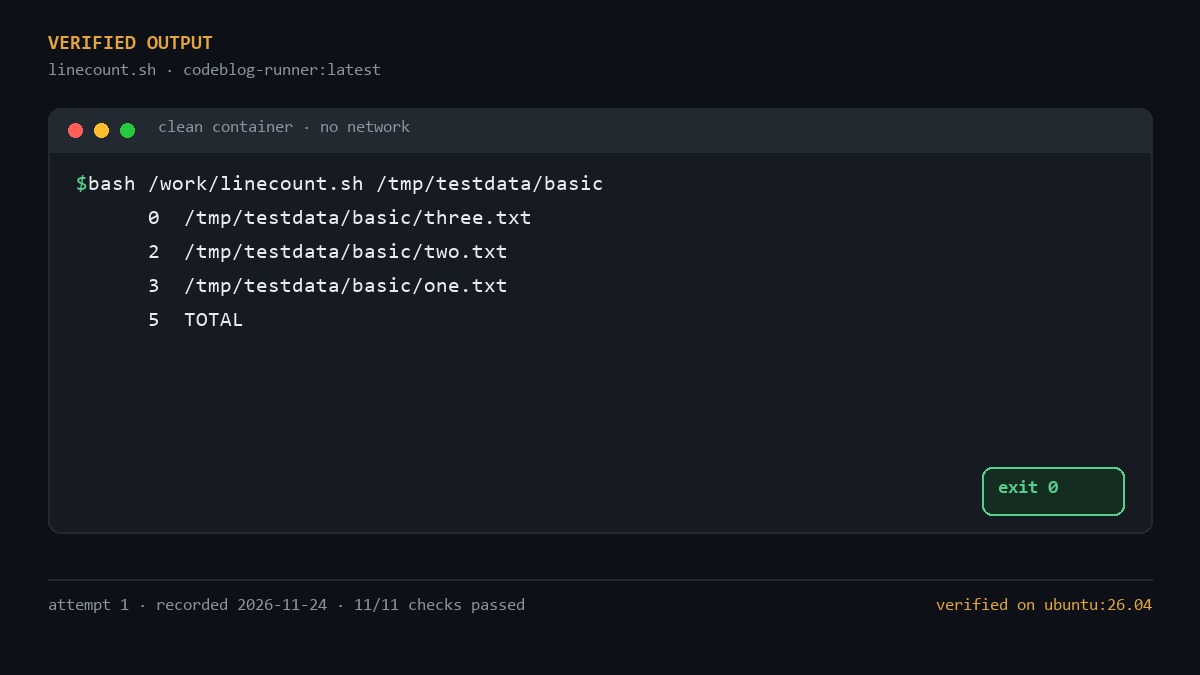
I tested this in a clean Ubuntu container. Here's what came out of a basic run on three files:
      0  /tmp/testdata/basic/three.txt
      2  /tmp/testdata/basic/two.txt
      3  /tmp/testdata/basic/one.txt
      5  TOTAL
The weird-filenames test, where the directory contains it's here.txt and file with spaces.txt:
      4  /tmp/testdata/weird/it's here.txt
      2  /tmp/testdata/weird/file with spaces.txt
      6  TOTAL
No quoting issues, no split paths. The null-delimited pipeline handles it.
The pattern filter test ran -p '*.py' against a directory tree containing both .py and .md files at depth 4. Only the Python file was counted:
      2  /tmp/testdata/deep/a/b/c/d/script.py
      2  TOTAL
Error handling worked as expected. A missing path gave exit code 2 with a clear message, and running with no arguments printed usage to stderr and exited 1. All 11 assertions passed on the first run. No bugs caught, no fixes needed. The script did what it was supposed to do.
The full script
#!/usr/bin/env bash
set -euo pipefail

usage() { echo "Usage: linecount.sh [-d depth] [-p pattern] [-q] <path>..." >&2; exit 1; }

depth="" pattern="" quiet=0
while getopts ":d:p:qh" opt; do
  case $opt in d) depth=$OPTARG;; p) pattern=$OPTARG;; q) quiet=1;; h|*) usage;; esac
done
shift $((OPTIND - 1))
[ $# -ge 1 ] || usage

for p in "$@"; do [ -e "$p" ] || { echo "Error: '$p' not found" >&2; exit 2; }; done

grand=0
while IFS= read -r -d '' f; do
  [ -f "$f" ] && [ -r "$f" ] || continue
  [ -n "$pattern" ] && { case "$f" in *$pattern) ;; *) continue;; esac; }
  n=$(wc -l < "$f")
  grand=$((grand + n))
  [ "$quiet" -eq 0 ] && printf '%7d  %s\n' "$n" "$f"
done < <(for p in "$@"; do
  [ -f "$p" ] && printf '%s\0' "$p" || \
  find "$p" ${depth:+-maxdepth "$depth"} -type f -print0
done)

printf '%7d  %s\n' "$grand" "TOTAL"
How to use it
Count everything in a directory:
bash linecount.sh /var/log/myapp
Limit to two levels deep and only count Python files:
bash linecount.sh -d 2 -p '*.py' ~/projects/api
Get just the total line count across several directories (quiet mode):
bash linecount.sh -q /srv/app /srv/lib /srv/config
Count a single file (it works, though you could just use wc -l directly):
bash linecount.sh /etc/nginx/nginx.conf
Pipe the output into sort -rn if you want files ranked by size:
bash linecount.sh /var/log | sort -rn
That last one is handy when you're trying to figure out which log file is eating your disk. The per-file counts make it a quick triage tool, not just a counting script.
